Showing posts with label Google. Show all posts

Monday, November 8, 2010

Flickr

I mentioned Multicolr in an earlier post but made the assumption that everyone knew what Flickr was and how it could be used in classrooms. Flickr is a Web 2 tool that allows you to manage your photographs and video online. This may mean creating albums, sharing with family and friends or even giving them the ability to organise your content - adding comments, tags or note. The app also allows you to create groups so that only invited people can access your photos. This makes Flickr perfect for schools. Create a group and invite students and parents to view portfolios of work, drawings, artworks, presentations, videos of role plays or even performances. Get the students into the habit of digitally documenting their work both process and product. This means that you also have evidence of outcomes and competencies. 


Many Flickr users have chosen to offer their work under a Creative Commons License, and you can browse or search through content under each of the types of licenses. This means that Flickr is a great place to find images to illustrate your handouts online worksheets or presentations. It also means that students can obtain images for their own presentations or assignment without breaching copyright.


Flickr also has the ability to Geo-Tag images. This means that images have the geographical location embedded into the digital information that is recorded with the image. You can locate where the image was taken on a google map or google satellite image.


Sunday, November 7, 2010

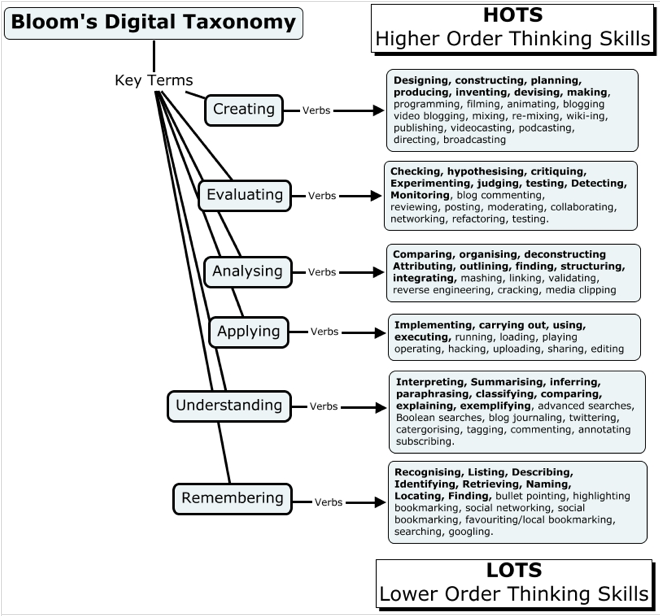
Bloom's Digital Taxonomy

Bloom's Taxonomy has been a cornerstone on which we have based our teaching practice. For many teachers it was the starting place when writing a task or even a unit of work. Unfortunately his Taxonomy does not take into account computers in schools or 1-to-1 laptops programs. 


In the 1990's, a former student of Bloom, Lorin Anderson and David Krathwohl, revised Bloom's Taxonomy and published Bloom's Revised Taxonomy in 2001. The major difference is the use of verbs rather than nouns for each of the categories and a rearrangement of the sequence within the taxonomy. 


This update to Bloom's Revised Taxonomy attempts to account for the new learning models emerging as technology advances and becomes more prevalent. Bloom's Revised Taxonomy describes many traditional classroom practices, behaviours and actions, but it also adds new processes and actions associated with Web 2.0 technologies. Bloom's Digital Taxonomy isn't about the tools or technologies rather it is about using these to facilitate learning. 


Bloom's Digital Taxonomy is the new go to document when designing activities. This list is the the Web 2.0 bible of activities. Use this as a starting point to get into Web 2 tools or use as a reminder of the other tools that your students could also be using.


Remember - the individual tools are irrelevant it is the processes and then the deeper learning that occurs with the use of some of these tools.


From Andrew Churches Website - http://edorigami.wikispaces.com/.